The Nickel Boys was on a lot of “Best of” lists for 2019 so I figured to check it out and I’m glad I did. I haven’t read anything else by Colson Whitehead so not sure if this is true with all of his writing but he got me to feel a degree of empathy for his characters that was so deep that by the end of the book I felt wrung out.
I don’t get that a lot.
Moreover, I’m a middle age white guy and here I am feeling really deep connection and empathy towards these African american boys in Jim Crow south. Whitehead’s ability to connect the reader to these characters is unreal. I found myself highlighting certain passages throughout the book that achieved this effect and by then end I realized that part of his skill lies in what I think of as a casual intimacy with the characters’ inner lives.
Meaning the powerfully brutal scenes built connection and alone they would have probably been sufficient. But certain scenes where the narrator makes these offhanded observations—like when waiting for a table at a restaurant, briefly wondering if the delay is racism or just bad service—reveal the lens through which the characters are viewing the world and by the end of the book you and the character are nearly one and the book is just a powerfully moving experience. Grateful that Whitehead wrote it and that I got to experience it.
I implemented this great python script from @micahflee to automatically get rid of my tweets after a specified period of time. Similar to the Chrome extension I use to get rid of my Facebook posts but automated/scheduled so much more convenient.
I’ve seen couple of blogs (Kirkville,BirchTree) recently opining on stereo HomePod configurations and comparing them to a pair of Sonos speakers. I don’t have a pair of Sonos to compare my stereo HomePod configuration to but my experience with the HomePods stereo pair may be useful for some so I am sharing here.
A few months ago we re-arranged the furniture in several rooms in our house. The net effect was that my Vandersteens (and, as such, my serious listening space) were relocated out of our living room and into a smaller room that has become my now dedicated listening area.
We spend a lot of time in our living room and–as we have large families–often times with a lot of people. I needed a music solution to replace my traditional HiFi and Vandersteen towers that didn’t take up nearly as much space. (Note: I have in-ceilings in the living room but they just don’t sound as good as regular speakers and really don’t fill up the room without creating two very loud areas underneath that make it impossible to carry on a conversation so we never use them in that room).
So when the opportunity came to pick up a second HomePod at a discount (I got mine refurb’d from Apple store but they show up new for $200 on sale on occasion), I decided to try a stereo pair of HomePods in the living room.
For this situation they are absolutely perfect. And by this situation I mean: a large living room area with seating all over the place where you want the music to sound good no matter where you are sitting. The HomePods are amazing at delivering good sound in this environment and I would argue that they are way better than my Vandersteens for this situation.
Sure, where the Vandersteens (or a pair of Sonos) might give you good sounds with great stereo imaging and a convincing sound stage, the eight speakers in the HomePods give you a really diffuse stereo field instead.
Yes, you give up a single sweet spot with vivid imaging. That said, about 85% of the seating options in my living room get a really full stereo sound field where you hear a balanced representation of both the right and left speakers.
The HomePods are strange in this way in that you can be sitting very close to one of the pair but still not sure if what you’re hearing is predominantly coming from the speaker closest to you or the one on the other side of the room.
Moreover, as you move further and further away from the HomePods, the volume of the music does not seem to fall off quite so rapidly. Meaning it’s easier to have a conversation in the room while music is playing and the music volume always seems just about right now matter where your are sitting.[1]
Bose 901’s featured multiple speakers for dispersion.
In this way, the HomePods remind me a lot of the Bose 901s. Say what you want about Bose but it is near impossible to beat the experience that pair of 901s delivers to a roomful of people listing to music outside of the dead center stereo imaging position that most speaker pairs mandate.
The HomePods, like the 901s before them, are for social music listening (as opposed to the lone experience of sitting dead center between a pair of towers) and they do a terrific job at that.
1.) This volume roll off is similar to the effect that our Bose L1 with an array of 24 speakers has in our live performances where the music seems to be a pretty constant volume no matter how near/far you are from the tower, it’s uncanny
note: forgot to hit publish on this on Friday 🙁 will try to do better this week!
How To Expand Launchpad
Hard for me to imagine Launchpad ever being as useful as Alfred for launching apps. That said, this tip for expanding the rows/columns of Launchpad might make a more compelling use case. Via Chris Hannah via @JPEGuin
On being able to write about whatever the hell you are interested in:
As someone with a bunch of interests, I’m all for a non-directional approach to blogging (via Josh Ginter and Initial Charge). I’m tired of reading commercial sites, have stocked my RSS app with independent publishers and have no regrets, especially when blog authors stray from their usual topics.
Love my Fuji X-E2s. It is the best camera I have ever owned, hands down. Whether I’m using an old Pentax lens on it or the pricey but awesome Fuji lenses, the thing is a joy to use.
That said, I don’t bring it with me nearly as often as I should. I feel awkward carrying it on a camera strap and it’s just a bit too big to fit in any of my jacket pockets. Probably need to get over that.
My MGB shot with my X-E2s and an old Pentax lens.
Still though, I have coveted the X100 series. I almost bought the X100 instead of the X-E2s but am glad for being able to use interchangeable lenses (something you can’t do with the X100 fixed lens).
My current camera still feels bleeding edge to me but newer Fuji’s have picked up some new film simulations and I’ve been keeping my eyes opened for a new version of the X100. The latest X100 is from 2017 (the X-E2s is from 2016) but it seems like Fuji may be on the verge of announcing a new X100.
The X100V has been whispered and rumored across the internet for many months. There’s no surprise that it’s coming soon. What we don’t know is how much different it will be from the X100F. It will certainly have the 26-megapixel X-Trans IV sensor and processor, and probably all of the new JPEG tools of the X-Pro3, but beyond that nobody knows. There’s been speculation for some time that Fujifilm redesigned the lens, but I don’t know if that’s true or not
It’s not just the new film sims but the variables at play in customizing the built-in film simulations that give me camera envy here. I am a huge fan of Ritchie Roesch’s recipes and on my older camera I usually have to just approximate some of the settings in the receipts.
When I write my morning entry in my Day One journal I sometimes brainstorm a little todo list, and this allows me to copy it and load the todo list into Things. Moreover, it looks for the string “today” in the brain dump and puts those items in the Today list in things.
set TodayStr to "today"
set Total to 0
set listContents to get the clipboard
set delimitedList to paragraphs of listContents


tell application "Things3"
	repeat with currentTodo in delimitedList
		if currentTodo as string is not equal to "" then
			set Total to Total + 1
			if currentTodo contains TodayStr then
				set newToDo to make new to do ¬
					with properties {name:currentTodo, due date:current date} ¬
					at beginning of list "Today"
							else
				set newToDo to make new to do ¬
					with properties {name:currentTodo} ¬
												end if
		end if
			end repeat
		end tell

set theDialogText to "Added " & Total & " Todo Items to Things"
display dialog theDialogText
I mapped this in Alfred to ⌘T so that when I’m in Day One and finish brainstorming what I need to tackle, I can just highlight the list and hit ⌘T and the list is moved to Things. Not brain surgery but really useful for me.
Still though it does feel weird to have to automate using AppleScript on the Mac and Shortcuts on iOS.
Back in the spring I wrote an automator action that incorporated some Python code to take a downloaded Amazon Order History file and massage it into a nice Markdown table and creates a Day One entry.
A few months back though the Day One command line tool stopped working and that broke this action. But surprise!!! The command line tool works again (although not as well as it used to). So I modified the automator action to get it working again.
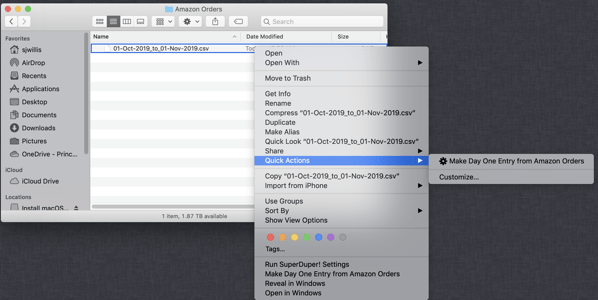
So, pop this workflow in your ~/Library/Services folder and you can just right click on the downloaded Amazon order history file to create a Day One entry from the purchases.
This is what the Markdown table looks like as a Day One entry (atypically expensive month, FWIW 🙂
So, if you use that code and replace “Today” with “Someday” it works like a champ but if you pass it the list “Today” the todo item is created in the Inbox and not the Today area of Things. Weird and it was making me crazy.
Anyway, the easy solution is:
set newToDo to make new to do ¬
		with properties {name:CurrentTodo, due date:current date}
I use Day One as a journal almost every day. Most mornings start with me doing a bit of a brain dump into Day One, listing anything that’s on my radar that I need to deal with.
So I wrote a shortcut to help me deal with those brain dumps a bit better.
This shortcut:
– takes a list of items from the clipboard (so, I would just select/copy the list in Day One) and creates entries in Things (my todo list app of choice for the past many years).
– With a bit of a rub: if the tasks contains the word “today” (e.g. I need to call Joe today) the shortcut puts the task in the Today section of Things instead of in the Inbox section.
Admittedly this is not really wizardry level stuff here and the inability to run a similar procedure on my Mac (shortcuts only working on iOS I mean) limits its use a bit. But anyway, for anyone running Day One on iOS who is interested, here’s the shortcut I use to extract a brain dump from Day One and load the tasks into Things.
When you support free, you support billionaires. When you pay, you support sane businesses and real creators. Start paying for things that cost money. If you can’t afford to, use fewer things, which generally make you happier anyway.
Very long but interesting post about Flickr. Where it is now, where it came from, etc. I haven’t renewed my Flickr Pro account in forever and don’t expect that I will simply because I have no need for it but we will definitely lose an important piece of Internet history if Flickr can’t sustain itself.
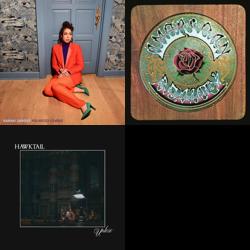
A few years ago I started making playlists in iTunes that only contained 3-5 albums and listened to those tracks exclusively for a few weeks before rotating them out. There is something about becoming really familiar with a recording, a whole album preferably, that rewards in a way that superficially skimming the surface of Spotify just doesn’t deliver. Thinking about restarting this practice somehow.
Who profits from our constant state of dissatisfaction? The answer, of course, is painfully obvious. Every industry that sells a solution to a problem you […]
The real problem, in my mind, isn’t in the nature of this particular Venture-Capital operation. Because the whole raison-d’etre of Venture Capital is to make […]
. The EU invokes a mechanism called the precautionary principle in cases where an innovation, such as GMOs, has not yet been sufficiently researched for […]
Saved Links
RSS Error: Retrieved unsupported status code "404"